










Mainspring for Mac
- Paid
- 4.9
- V3.4.0
Download for Mac
View an ad to download for free

- Everyday Mac Tools
Reveals hidden macOS settings as 90+ one-click, reversible power-ups, recipes, and scenes.
Mainspring: the hidden settings of your Mac, one click each
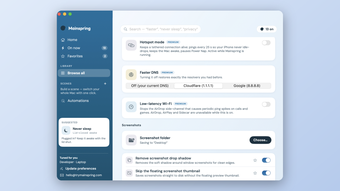
Your Mac can do far more than System Settings lets on. Apple tucks hundreds of useful options behind Terminal commands, obscure preference keys and forum threads. Mainspring brings them into one calm, native app and turns each into a simple switch you can flip and undo.
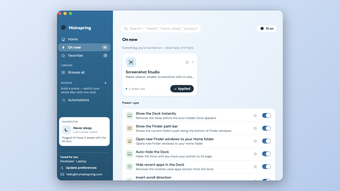
The idea is trust. Every change Mainspring makes is saved along with the exact value it replaced, so turning something off puts back precisely what you had before. You can try things freely, because nothing is a one-way door.
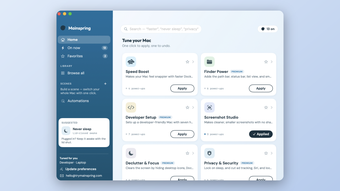
Recipes: the fastest way to a better Mac
Recipes are curated bundles of power-upse click.
- Speed Boost makes the Dock appear instantly and cuts animation delays so the whole system feels snappier
- Finder Power adds the path bar, statusr search
- Developer Setup shows hidden files and all extensions, speeds up key repeat and stops network .DS_Store
clutter
- Screenshot Studio saves clean screenshots with no drop shadow and no floating thumbnail
- Declutter and Focus hides desktop icon clears out recent apps
- Privacy and Security locks on sleep and cuts down on ad tracking and Siri suggestions
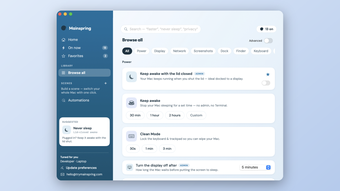
Browse about 90 power-ups
Not every tweak belongs in a recipe, so the full library is there too. Browse by category, such as Power,
Display, Network, Screenshots, Dock, Finsearch for what you want. Typing"faster", "never sleep" or "privacy" finds the right switches even when the setting is named something
technical. A simple view keeps things frggle reveals the deeper options.
Scenes and automations
Scenes let you save a whole setup and sw click. Build one from your currentsettings or pick power-ups by hand, then move between a focused work scene and a relaxed evening scene
without touching a single preference.
Automations apply settings for you. Choog does the rest:
- when you plug in or unplug the power
- when the battery drops below a level y
- when an external display connects or disconnects
- when a specific app opens
- at a set time each day
- when your Mac wakes
Keep your Mac awake, your way
Keep awake stops your Mac from sleeping wo hours or a custom time, with no adminpassword and no Terminal. For docked setups, keep awake with the lid closed lets your Mac keep running when
you shut the lid. Clean Mode locks the k short time so you can wipe your Macwithout triggering anything.
Mac Health
Mainspring quietly watches for problems that make a Mac feel sluggish or broken, such as a stuck system
service, heavy memory pressure, a nearlyas not restarted in weeks. When something looks wrong, a small indicator appears in the menu bar and a one-click fix is waiting in the Health pane.
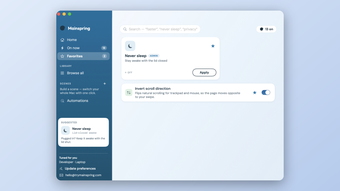
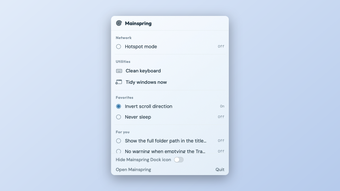
Always within reach
A menu bar icon opens a compact panel with your favorites, so the settings you reach for most are one click
away. Star any power-up or recipe to pinngs like Dock size and magnificationapply live as you drag.
Built the Mac way
- Native app for macOS 13 and later, universal for Apple silicon and Intel
- Developer ID signed and notarized by AGatekeeper warnings
- No account to create, and your settings and history stay on your Mac
- Revert any single change, a whole reci
Mainspring is for anyone who has ever seis on Mac" and ended up pasting commandsinto Terminal. Get the tweaks, keep the safety net.
Loading…
App specs
Developer
- Everyday Mac Tools
License
Full
Version
3.4.0
Latest update
Platform
Mac
OS
macOS 10.15
Language
English
Size
4.50 MB
Mainspring for Mac
- Paid
- 4.9
- V3.4.0
Download for Mac
View an ad to download for free
User reviews about Mainspring
Have you tried Mainspring? Be the first to leave your opinion!
Add reviewTop downloads Keyboards for Mac
Top downloads Keyboards for Mac
Top downloads Keyboards for Mac
Related topics about Mainspring
Latest articles

Facebook Marketplace text scam: it uses your name to trick you

Star Wars: Galactic Racer launches today: free on Luna with Prime

GameStop now lists used PS5 Pro consoles above MSRP: up to $1,499.99

AI Portrait Tools Now Let Parents Skip School Photo Fees

South Korea proposes $3.49 billion AI plan: its biggest push yet
Laws concerning the use of this software vary from country to country. We do not encourage or condone the use of this program if it is in violation of these laws. Softonic may receive a referral fee if you click or buy any of the products featured here.